Reading made easier!

Hello my fellow friends!

The Internet is growing day by day and the new information keeps entering the web. As there are a lot of information, it becomes harder to follow and harder to stay updated. It consumes a lot of time to visit our favourite sites one by one to keep ourselves informed. We need to keep the necessary information in one place . Therefore, we can actually use RSS Feeds Readers.

At the beginning of Instructional Technologies & Material Design course, before we created our blogs, we talked about RSS Feeds,how to use them and why it is essential to use. We started to use RSS Feed readers throughout the academic year and as a task, we were assigned to share our experiences about RSS Feeds Readers. Before i tell you about my experience with RSS feeds Reader and the blogs that i follow, i would like to talk about RSS Feed.

What is RSS Feed?

RSS (Rich Site Summary) is a format for delivering regularly changing web content. Many news-related sites, weblogs and other online publishers syndicate their content as an RSS Feed to whoever wants it. It is easy to use and it solves the problem for people who regularly use the web.

What is this problem and how RSS Feed can solve this?

As I mentioned above, for people who use the web all the time,it is difficult to follow so many blogs and websites. RSS Feed allows them to easily stay informed by retrieving the latest content from the sites they are interested in. They save time by not needing to visit each site individually. Moreover, they ensure their privacy, by not joining every site’s email newsletter.

How can we use RSS Feed?

It is very simple to use. You can use web-based readers such as Feedly, Bloglines, Flipboard or Pocket. If you don’t prefer a web-based reader, you can find other platforms. You can choose from numerous RSS Feed Reader programs such as FeedReader, AmphetaDesk or Feed Demon and download them.

RSS Feed Readers and I

I chose a web-based reader as i didn’t want to download a program on my computer . I think that web-based ones are a lot quicker than the program ones. You can add your web-based reader in your bookmark and with just one-click, you can follow and read your favourite news and blogs. Thus, Pocket is very suitable if you prefer this type of reader as it has an extension for the web browsers. Before this assignment i used to use Flipboard and Pocket unconsciously which means that i didn’t know that i was using an RSS Feed reader. But, this time i wanted to try something else and use the RSS Feed with its full potential, i wanted to follow more education-oriented blogs so i chose Feedly and i was really impressed by its simple interface. The site is very easy to use and you can collect the sites you follow under a category.
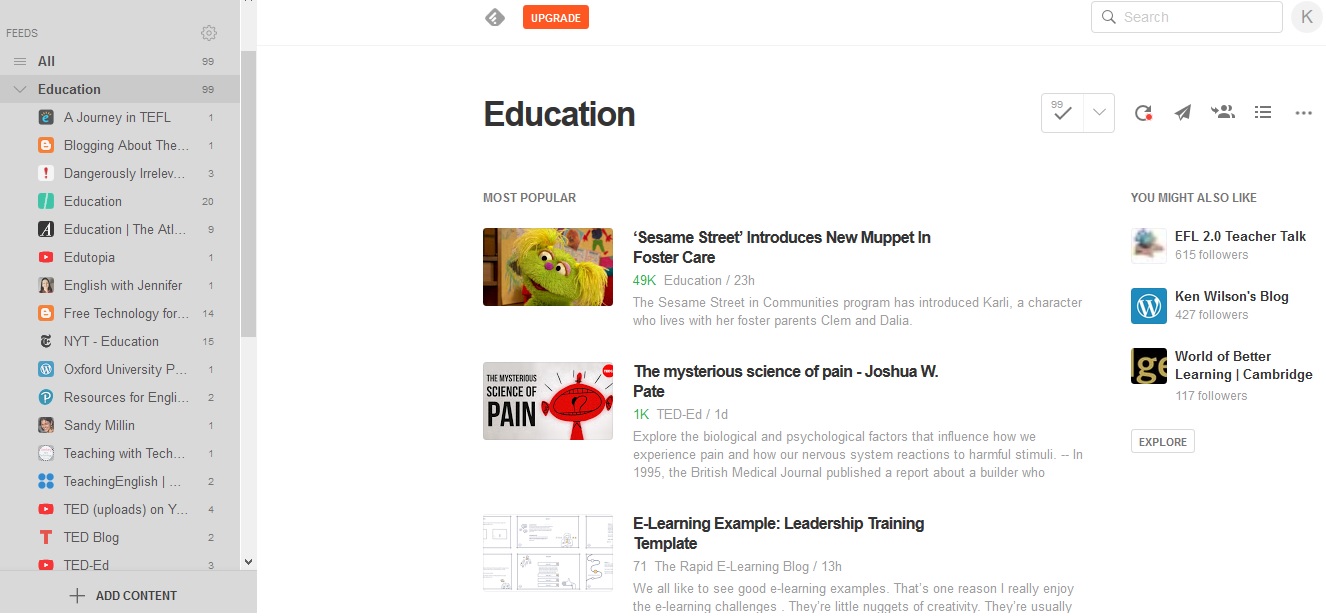
A screenshot from my Feedly Account

I mostly follow educational content in Feedly and one of my favourite blogs is Free Technology for Teachers. I am more aware of the use of technology in ESL/EFL classes thanks to our course and I’m trying to find information as much as possible, from integration of technology to technological tools. The blog suggests various of activities with technological tools and how can Ss and Ts can use them. In addition, in this blog you can also see some alternatives for certain features of a technological tool if they are removed.

A screenshot from the feed of Free Technology for Teachers Blog

I do believe that every ELT teacher can benefit from this blog as its content isn’t only limited to activities with technology but so many review of technological tools, how to use them, how to solve issues related to the tools etc. We’re not technology experts and sometimes certain tools are too complicated to use , this blog facilitates them. The tips and suggestions are efficient as well. If you’re an ELT teacher or an EFL/ESL student, follow this blog and I’m sure you will enjoy it.

To sum up, using RSS Feed Reader is helpful in so many ways. As you’ve seen, it is very easy to keep track of the content from your favourite sites. I really do enjoy using Feedly on a daily basis and i feel like I’m reading more thanks to Feedly. I absolutely suggest everyone to try RSS Feed Readers. Trust me, you won’t regret it!

Thanks,

K.

Storytelling at its best…

Hello my fellow friends!

Do you listen to your grandpa enthusiastically when he starts telling you all his youth stories or you pretend to like it while counting the minutes? If your answer is yes to the first question, congratulations you’re an amazing listener. Don’t forget to thank your grandfathers for their interesting, creative storytelling skill.

Storytelling is a creative way to breath life into written works and the good news is grandpas ARE NOT the only ones who can tell amazing stories. Students and teachers can tell a lot of creative stories in ESL/EFL classrooms.

Why should we use storytelling?

The answer is simple. Storytelling,in fact is quite popular. So many youtubers have storytelling videos and “Draw My life” was actually a digital storytelling trend. Moreover, learners can tell their original stories and share this in a very vivid, fun way  with their peers. Storytelling will let them improve not only their writing skills but also their pronunciation as well. They will develop their speaking abilities and will be able to talk freely.

Why Digital though?

Back to grandpas. Some of us enjoy listening to their stories but unfortunately some of us lose interest listening to them. Have you ever asked yourself “why”? Is it because of their old age? NO! The reason is, we find it boring. Not the stories. The way of telling. We don’t want our students to get bored while telling stories so teachers and students should make these stories as attractive, as effective as possible by providing audios, videos, images, posters etc. related to them. They can even draw or make animations! They can use various tools to make their stories digital from online tools to movie making programs.

Our Digital Storytelling Experience

My friend Murat and I tried digital storytelling for our course to experience it and show you how you ,as teachers or students, or grandparents 🙂 can use digital storytelling. We’ve talked about our friendship, we made a video with our photos as slides. We used “iMovie” to make our video but you can find many alternatives for yourself and students. It was nice to tell our story of friendship and how we perceive friendship. Digital storytelling is actually something quite powerful if you can carry your message in an effective way. You can watch our video here and check out Murat’s blog as well. We’ll appreciate it.I hope you like it!

Thanks

K.

Websites to use, websites to teach!

Hello my fellow friends!

How have you been? I’ve been busy all this week but that’s how a student’s life is, right?  I couldn’t even get a chance to sit in front of my laptop and check on my blog. All I could do -when I had the chance- was visiting certain websites and just spend a few minutes there before I doze off.  

We all have a few websites we visit on a daily basis. But as an ELT teachers and learners, how many of us have an ELT website that we cannot stop using? Or why do we need them and how useful are they? In this post I want to share an ELT website and my evaluation on it.

Websites -either authentic or created for English learning and teaching purposes- are part of our teaching in the classrooms. There’re thousands of ELT websites all over the Internet for students and teachers to benefit. One of these websites that I have found is EnglishClub.

EnglishClub is a website dedicated to English language learners and English language teachers by offering various activities, games, tests etc. for learners and lesson plans, worksheets, articles etc. for teachers. The website is part of TEFL and EasyEnglish and founded by Joe Essberger.

The Purpose

EC is a free website designed to help students learn English online. It allows students to;

  • make their own English page with blogs, photos, videos, music, groups and friends
  • test their level in English and get help with English grammar
  • study English grammar, vocabulary and pronunciation
  • play English games and do English quizzes online
  • chat in English with other students and teachers
  • find schools where they can learn English at home or abroad
  • find penpals for English practice

The Site and the Author

Joe Essberger is the author of the site which was found in 1997 and is the contributor almost all activities on the website as well as the others. He is an English native speaker and an English teacher. As far as I could observe he is still active and writes post on the blog and forums regularly.

The Content

As I mentioned above, the content of the website is extremely rich. From listening activities to games and more, you can find what is suitable for yourself. If you want to improve your speaking skill, not only you can check the activities on the website, but also use the forumsand MyEC section to find pen pals and communicate with other English speakers. Moreover, I think the content is original as well. You don’t see typical topics to teach certain vocabulary but some different functional content. The site allows you to contribute articles as a guest for the learners of English. In addition, EC is written mainly in British English. But they have pages about other varieties of English such as American or Canadian. Overall I liked the content they have so far.

The Accuracy, the Broken Links and the Images

As I went through the content of the website I haven’t seen any mistakes or irrelevant, unrelated topics or stuff. Even if you encounter some spellings that you can take as a mistake, do not act on a whim! In fact they’re not spelled wrong, they are just written/pronounced in either American accent or Canadian. Although everything was going so well, I didn’t like the website’s organization. I find it quite dense. The images of the websites are in high quality and mostly relevant to the topics they are presented in. There’re lots of exterior links in the website and I tried a few of them and they were working just fine. I don’t think you can see a broken link as the site gets updates frequently.

Is it applicable to EFL teaching?

After all these points I’ve discussed in this post, I believe that the website is already meant for EFL/ESL learners and teachers and I can say that it can be applied in EFL teaching. Teachers can benefit from the worksheets and lesson plans of the website and they can still use it as an online tool as well since the website has lots of online activities, games etc. Students can use EC easily at school and at home yet the website lacks attractiveness for students, it is just so simple.

My overall evaluation is that we can make EnglishClub as a part of our classrooms as it has useful sections and keeps students engaged.

Pay a visit to EnglishClub and tell me if you agree with me or not in the comments section below. One more thing, if you already have some websites you use for English, put those in your comments as well.

I hope you enjoy my evaluation.

Thanks,

K.

Wikibooks

Hello everyone!

I’m back with another post. I know what you’re thinking, and yes you’re right, I’m pretty quick. Jokes aside, this week our assignment in Instructional technologies and material design was to create a wiki page with a review of a book that we read.

I wanted to write a review on Yukio Mishima’s story called “The Sailor who Fell from Grace with the Sea.” It was a book that i had quality time with and writing a review on it was also a different experience. The review made me think one more time on the book and i realize now how deep the book was .

I hope you like it as well and start reading the book influenced by my wiki entry.

Thanks for reading!

K.

Illustration by: Annya Marttinen

A Full of Mystery Podcast

Hello everyone!

It has been a week since i posted on this blog. Today i’m going to post something that i had fun while creating.

As you may know, “A linguaphile’s Notes” was created as part of an assignment for “Instructional technologies and material design” lesson. Another task we had, was to create a podcast. I love listening to podcast and this time i was the storyteller, not the listener.

I wasn’t alone though. I’ve created the story and the podcast with my friend Murat. Don’t forget to check on him as well!

Without any further due, enjoy listening the podcast.

Thanks for listening!

https://vocaroo.com/i/s1nOR9vJH6qb

P.S: Keep in mind that i’m an amateur ☺️

P.S: Let me know your thoughts on the ending! What could “the thing” be?

K

Illustration: Myeong Minho